Work From Home Setup Essentials to Boost Productivity
Work from home setup essentials for productivity. Monitor, chair, desk, lighting, and ergonomics prioritized by impact.
Anúncios
Work from home setups range from functional to productivity-destroying based on a few key decisions about your equipment, environment, and workspace organization. Getting these fundamentals right costs less than most people expect and pays for itself through sustained daily performance.
This guide covers the essential elements of a productive home office setup prioritized by impact so you can invest where it matters most regardless of your budget.
Which Equipment Has the Biggest Productivity Impact?
Anúncios
An external monitor provides the single largest productivity improvement for desk-based work. Research shows that dual-monitor setups increase productivity by 20 to 30 percent by reducing window switching and enabling simultaneous reference viewing.
A 27-inch monitor at 1440p resolution costs 200 to 350 dollars and transforms laptop-based work immediately. This investment pays for itself within days through reduced eye strain and increased multitasking efficiency.
How Important Is Your Chair for Long-Term Health?
Anúncios
Your office chair is a health investment, not a comfort expense. Eight hours daily in a poorly designed chair creates back pain, posture problems, and repetitive stress injuries that accumulate over months and persist for years.
- Adjustable seat height that lets your feet rest flat with knees at 90 degrees
- Lumbar support that maintains your spine's natural curve throughout the day
- Armrests that let your shoulders relax without hunching or reaching
- Seat depth that supports your thighs without pressing behind your knees
- Breathable material that prevents heat buildup during extended sitting periods
Desk Options That Fit Different Spaces and Budgets
Standing desk converters that sit on existing furniture start at 150 dollars and provide sit-stand flexibility without replacing your entire desk. Full standing desks with electric adjustment mechanisms run 300 to 600 dollars for reliable daily use.
Your desk needs enough surface area for your monitor, keyboard, mouse, and a notepad without feeling cramped. A minimum of 48 inches wide and 24 inches deep provides adequate space for most setups.
What Lighting Setup Prevents Eye Strain?
Position your desk perpendicular to windows rather than facing them directly. Side lighting reduces screen glare while providing natural light that improves mood and alertness during working hours.
A desk lamp with adjustable color temperature supplements natural light during cloudy days and evening work. Warm light in the evening reduces blue light exposure that interferes with sleep quality.
Internet Connectivity Requirements for Remote Work
Video conferencing requires 5 to 10 Mbps upload speed for reliable quality. Speed tests during your typical working hours reveal actual performance better than advertised maximums which represent ideal conditions.
Wired ethernet connections eliminate the latency and dropout risks that Wi-Fi introduces. A simple ethernet cable from your router to your desk costs under 20 dollars and dramatically improves call quality and file transfer reliability.
Audio Equipment That Improves Meeting Quality
Laptop microphones and speakers produce audio quality that frustrates colleagues and clients on calls. A dedicated headset or external microphone at any price point outperforms built-in laptop audio significantly.
Noise-canceling headphones serve dual purposes: improving audio quality on calls and creating focus environments during independent work. The 200 to 350 dollar investment in quality noise-canceling headphones pays daily dividends.
How Should You Organize Your Workspace?
Clutter increases cognitive load by competing for your visual attention during focus work. A clean desk with only current work materials visible reduces mental friction and supports sustained concentration.
Cable management using simple clips and ties prevents the visual chaos of tangled cords. A charging station that consolidates device charging to one location eliminates scattered cables across your desk surface.
Creating Environmental Separation Between Work and Living Space
A dedicated room for your office provides the best separation. When a dedicated room is not available, room dividers, curtains, or even a specific desk orientation that faces away from living areas creates psychological distance between work and home zones.
The spatial separation matters more than the space quality. A small dedicated area consistently used for work only creates stronger work-rest boundaries than a beautiful but shared space that blurs the line.
Ergonomic Accessories Worth the Investment
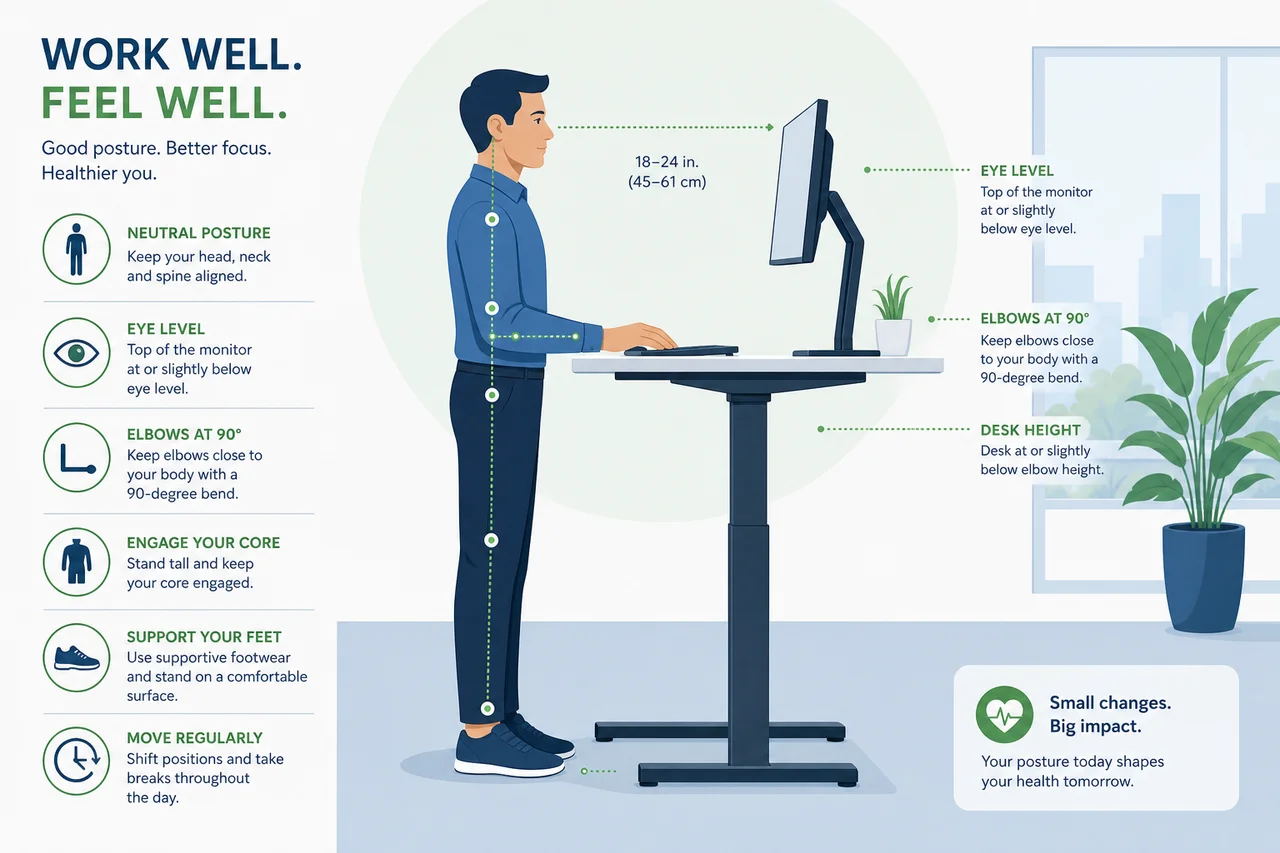
An external keyboard and mouse allow you to position your screen at eye level while keeping your hands at the correct typing height. This separation prevents the neck strain and wrist problems that laptop-only setups create.
A monitor arm frees desk space and enables precise screen positioning. A footrest helps shorter users maintain proper posture when desk and chair heights cannot adjust sufficiently for their frame.
Budget-Friendly Setup Options Under 500 Dollars
Prioritize in this order: monitor at 250 dollars, keyboard and mouse at 80 dollars, desk lamp at 30 dollars, cable management at 20 dollars, and a headset at 60 dollars. This 440-dollar investment transforms a basic laptop setup into a productive workspace.
Upgrade your chair next when budget allows. In the interim, a lumbar support cushion at 30 dollars and a seat cushion at 25 dollars improve an existing chair's ergonomics significantly.
When to Invest in Premium Equipment
Premium equipment makes sense when you spend eight or more hours daily at your desk and when specific tools directly impact your work quality. A photographer needs a color-accurate monitor. A developer needs a mechanical keyboard. A podcaster needs a quality microphone.
For most knowledge workers, mid-range equipment provides 90 percent of the benefit at 40 percent of premium pricing. Diminishing returns set in quickly above the mid-range threshold for general office work.
Should your employer pay for home office equipment?
How often should you replace home office equipment?
Is a standing desk worth the investment?
Can home office expenses be tax deductible?
What is the ideal room temperature for a home office?
Your home office setup directly influences your daily productivity, physical health, and professional presence on video calls. Strategic investment in the right equipment creates a workspace that supports sustained high-performance work without breaking your budget.